Official Guarantee | Direct connection to official models with stable generation, no throttling, and no degraded quality! Pro plans are on sale.Upgrade Now

Event themes · Headline hierarchy · Calls to action

AI Promotional Poster Maker

Help readers understand the theme first, then find the important details. Choose an event, sale or product promotion and arrange its headline, main visual and supporting copy.

Sign in to generate images. A 1K square image costs 1 credit. Other resolutions and image counts are charged according to your settings. Check prices, dates, locations and headline text before publishing. Add a working QR code in a separate editor.

Dragon Boat Festival Promotion Poster: AI posters example

Dragon Boat Festival Promotion Poster

Inspiration example · Source: 行者AI视频 · Generated results may vary

Choose a direction for your project

Event and holiday announcements

Give the theme, time and location a clear hierarchy. Keep the main visual relevant to the event and leave room for registration or contact details.

Sales and livestream promotions

Lead with one main selling point, then add offer details and a call to action. Confirm the prices, conditions and promotional copy yourself.

Food and product advertising

Combine product imagery, a short headline and brand colors. Avoid making several selling points compete for attention.

AI posters: inspiration and prompt templates

These examples come from their original creators in the inspiration library. Use them as visual references; they have not all been tested on image2.vip. Use these examples to study headline hierarchy and composition. Replace the brand, language, prices and copy, then choose a landscape or portrait layout for your use case. Add QR codes and precise text in a separate editor as needed.

Dragon Boat Festival Promotion Poster

Holiday sale posters

Dragon Boat Festival Promotion Poster

Use a seasonal main visual, a bold headline and offer details at the bottom to establish a clear reading order.

What to check: Replace the holiday, product and offer terms. Check headline lettering and price text.

Source: 行者AI视频
3D E-commerce Livestream Poster

Livestream and event promotions

3D E-commerce Livestream Poster

Organize a focused promotional image with a main headline, information cards and a call to action.

What to check: Replace the example discounts and shipping promises with accurate copy, and reduce excessive decoration.

Source: 小贰,來壺酒
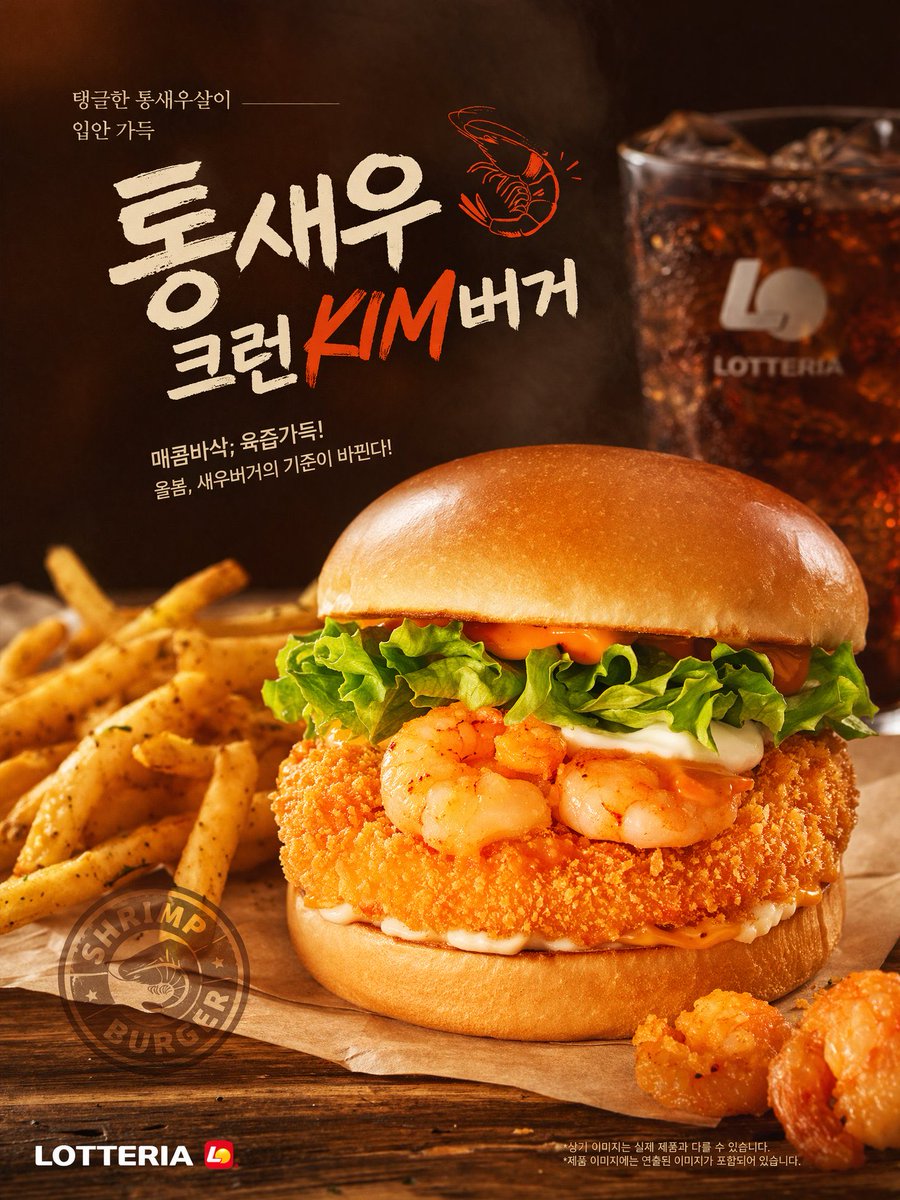
Fast Food Shrimp Burger Advertisement Poster

Food advertising posters

Fast Food Shrimp Burger Advertisement Poster

Study the food subject and surrounding space to give the headline and selling points clear positions.

What to check: Replace the example brand and Korean text. Check the food appearance against the product you actually offer.

Source: Aditya ⚡Rao
Korean & English Learning App Promo Poster

App and course promotions

Korean & English Learning App Promo Poster

Arrange a landscape promotion with copy on the left and an interface illustration on the right.

What to check: Replace the features, brand and interface content. An illustrative screen does not prove that a product feature exists.

Source: Azyu
Explore more AI posters ideas

Turn a promotional goal into a poster

  1. 1

    Define the theme and action

    Write down what you are promoting and whether readers should register, learn more or participate. Then choose one main headline.

  2. 2

    Prepare accurate event details

    List the time, location, price and essential notes. Shorten secondary information and specify separate areas for the headline, body copy and open space at the bottom.

  3. 3

    Adapt a template and choose the format

    Replace the theme, colors and copy in the homepage generator. Choose an aspect ratio for the display location and upload your own product or person references when needed.

  4. 4

    Review and finish the layout

    Check the text and event details, then preview the actual display size and edge cropping. Use an editor to add precise copy or a working QR code.

Separate the headline, details and background

Give the main visual and headline one clear focus each, then arrange the supporting information. Request clean space wherever you plan to add text later.

A generated image can serve as a promotional design draft. Before printing, also check dimensions, resolution and layout requirements.

Create a portrait poster for a weekend book discussion. Use the exact headline "Read Together This Weekend". The main visual is a wooden table, an open book and a cup of coffee, with warm natural light and a simple cream and dark green palette. Place the headline at the top and the main visual in the middle. Leave a clean area at the bottom for the time, location and registration QR code to be added later. Do not invent dates, prices, brands or QR codes.

AI posters: frequently asked questions

Can it generate exact prices and dates?

You can specify exact text in the prompt, but the result may still contain typos or incorrect digits. Check each item. Important details can also be added in a separate editor.

Can I use a generated QR code for registration?

Do not use an image-generated QR code as a working link. Create a QR code for your actual registration address, add it in an editor and test it by scanning.

Can I download an editable poster source file?

The current output is an image without text layers or a layout source file. Use a layout tool to change precise copy or prepare a print-ready design.

How does this differ from product images or RedNote covers?

Product imagery focuses on the product appearance, while a Xiaohongshu (RedNote) cover introduces a post topic. A promotional poster emphasizes the headline, event details, offer conditions and call to action.

Does using a prompt also add the example image?

Only the selected prompt is loaded into the generator. The example image is not added automatically. Replace the example people, products, brands and text with your own details, and upload your own reference images when needed.

Do I need to sign in, and how are generations charged?

You can browse examples and guides without an account. Sign in to submit a generation. Credit usage depends on output resolution and image count, and available settings depend on your plan. See the pricing page for details.

Create a promotional image for your next event

Define the theme and copy, choose a template and explore layouts in the generator.

Open generator

Explore more ways to create